Track every trade.
Improve every session.

The trading journal built for futures traders. Auto-sync every trade, analyze every account, and track the patterns keeping you from your best trading.

Auto Sync Your Trades P&L
$ 10 /Month
Save $21 vs monthly
Features

Everything the expensive journals have.
At a price that stays in your account.

Built by a trader for traders. Every feature exists because futures traders need it — whether you're on a prop firm eval or trading your own capital.

Automatic Sync
Eval FeesNet P&LTrue CostPDF Export
TrackyTrade connects directly to NinjaTrader 8 and Quantower for real-time trade sync. Every trade logs automatically the moment it closes — entry, exit, PnL, duration, and bar data. A CSV watch folder handles all other platforms. No manual entry, ever.
Calendar P&L View
Every Green DayEvery Red DayMonthly TotalsPer Account
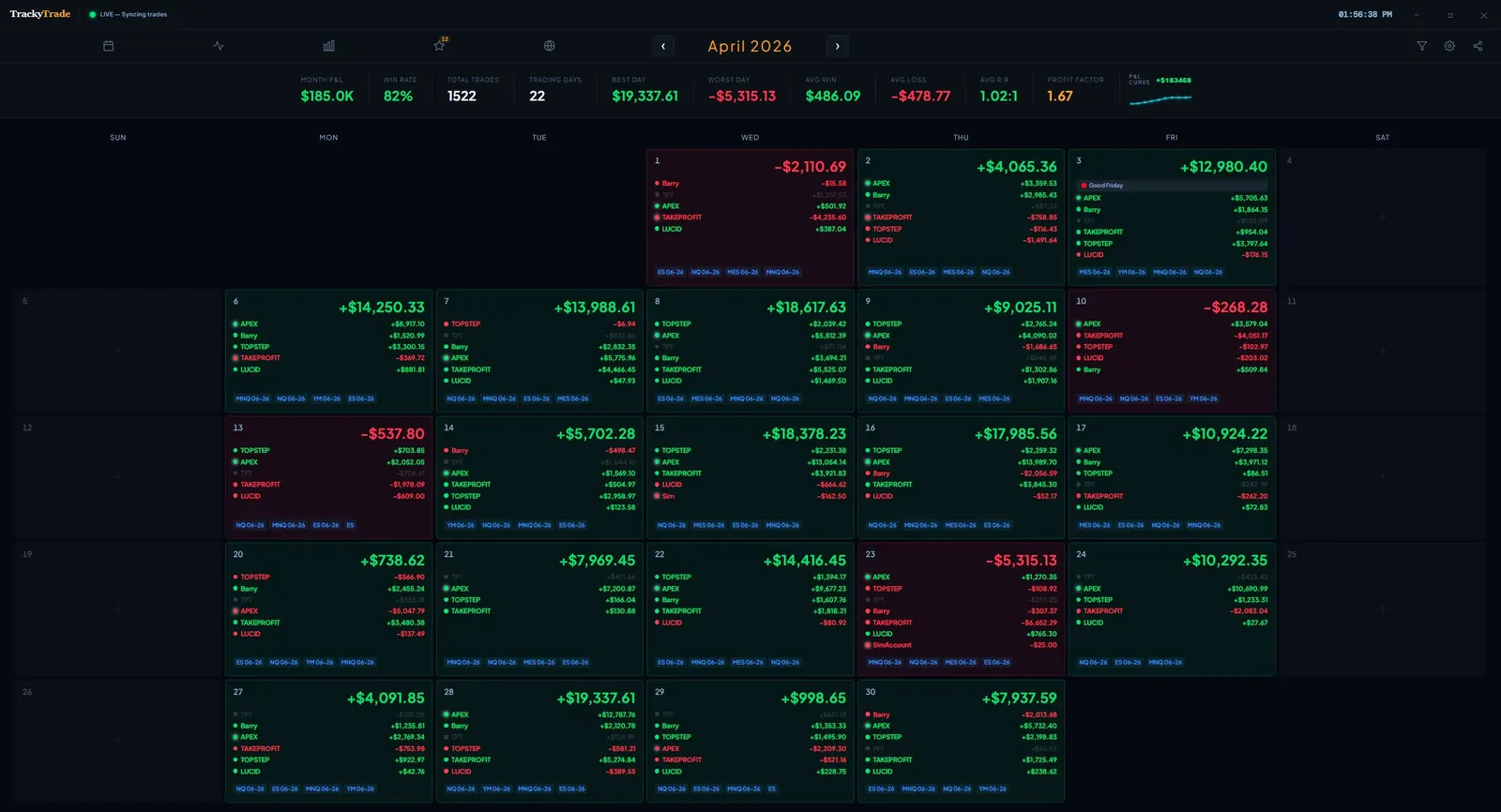
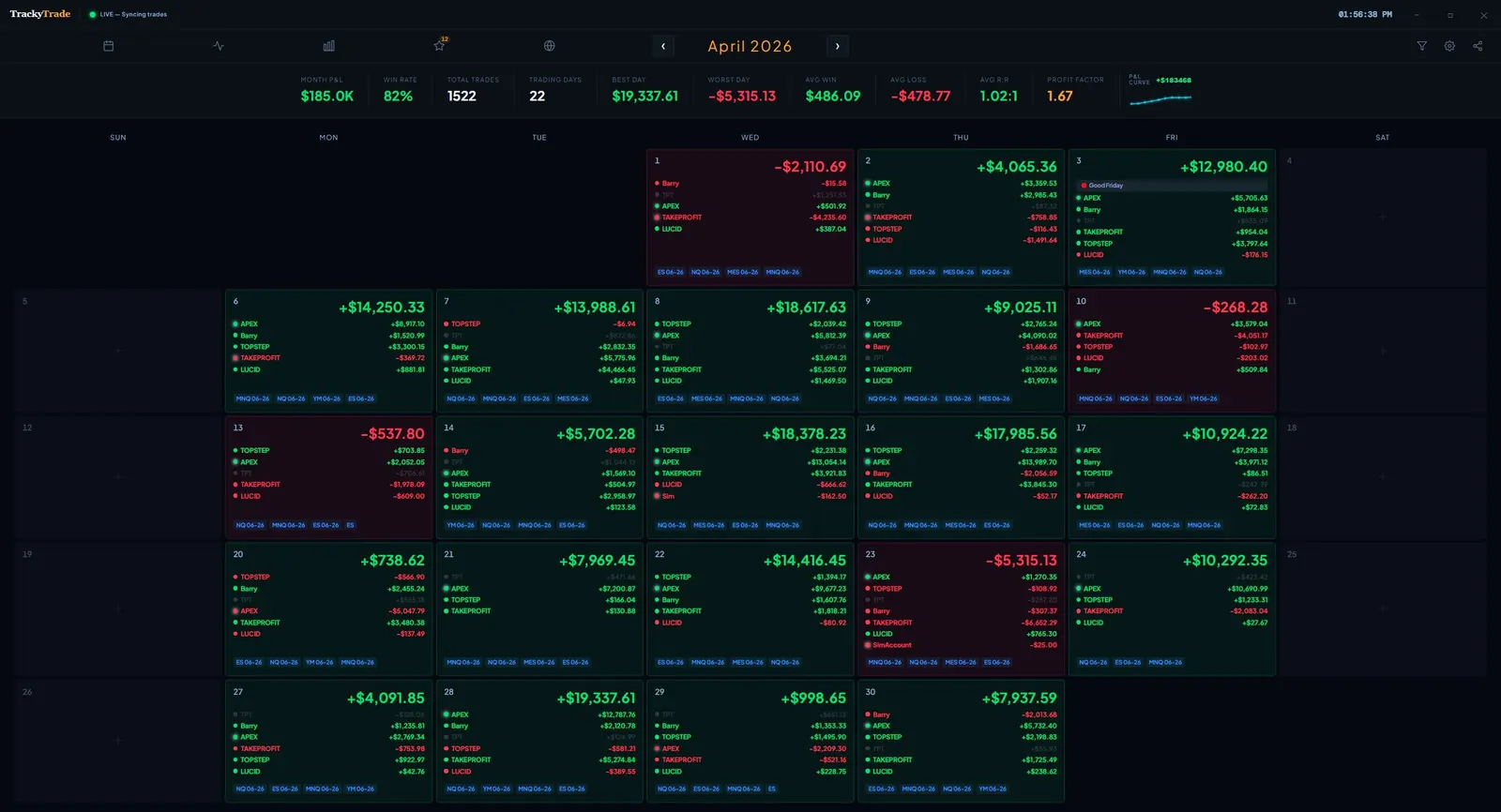
See your entire month at a glance. Each day shows your net P&L, the accounts you traded, and the instruments you were in — color-coded green and red so patterns jump out instantly. Click any day to drill down into the individual trades.
TrackyTrade Calendar P&L View
Calendar P&L View
Prop Firm Management
Multiple FirmsDrawdownPayoutsMilestones
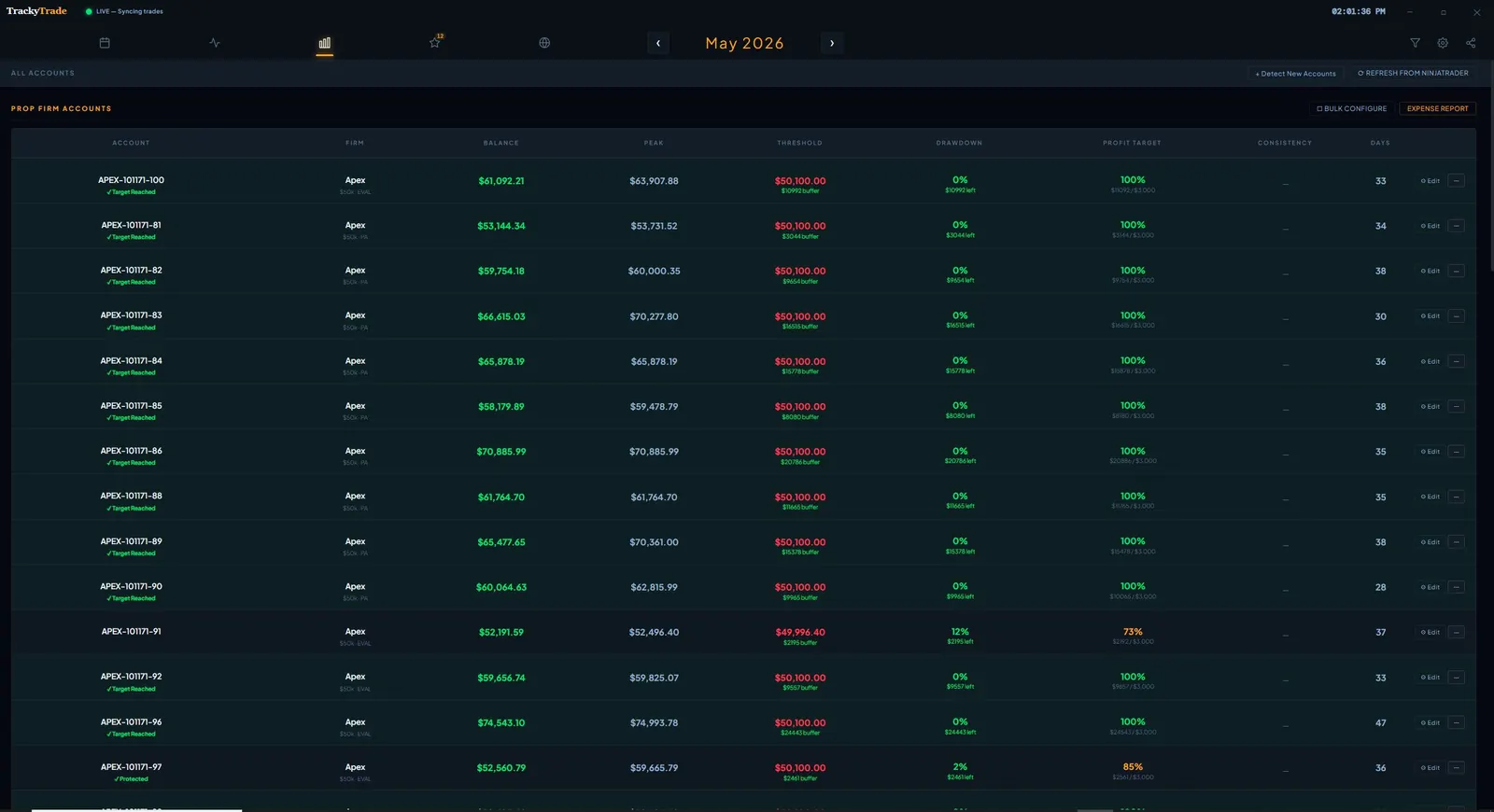
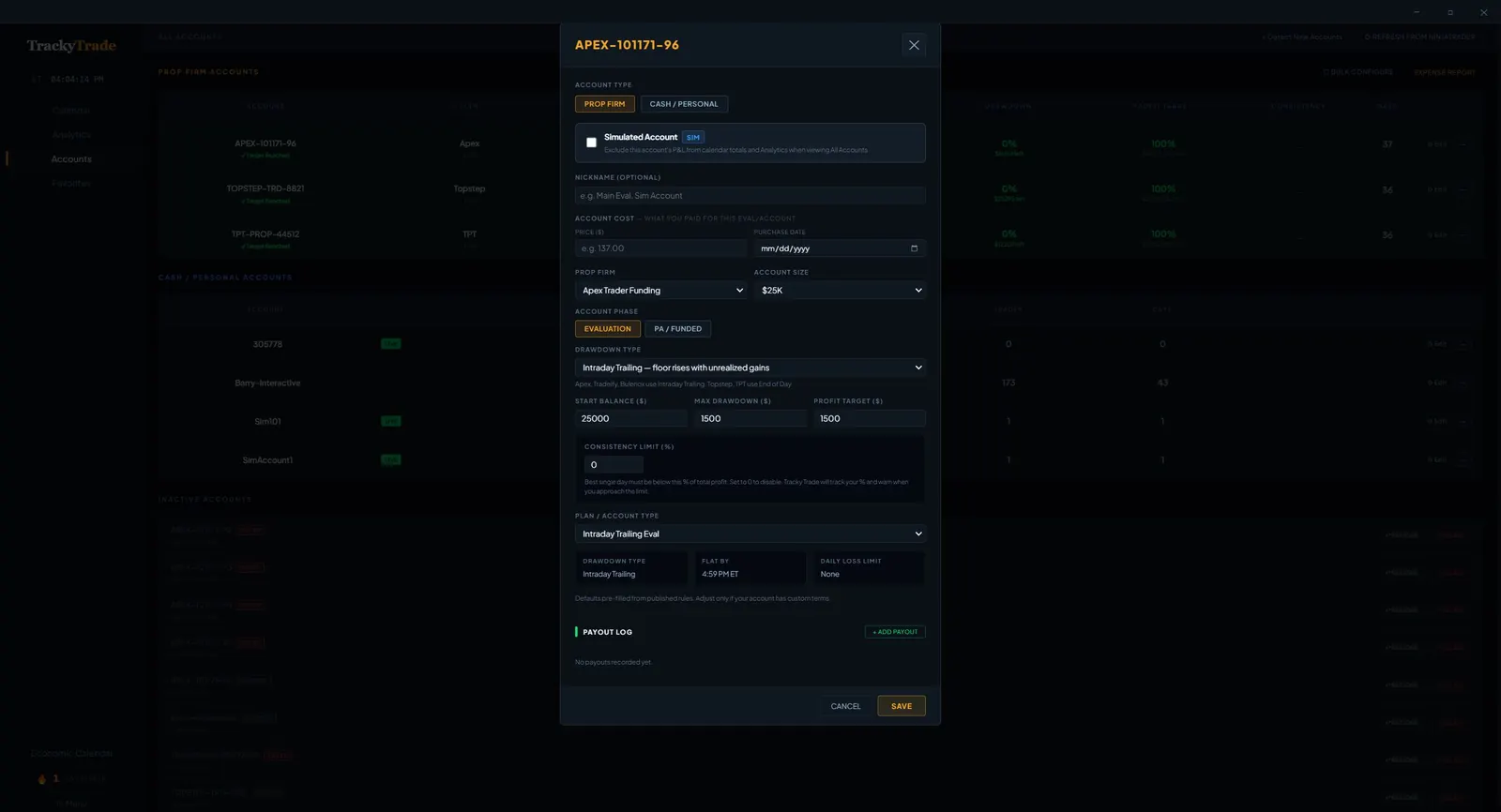
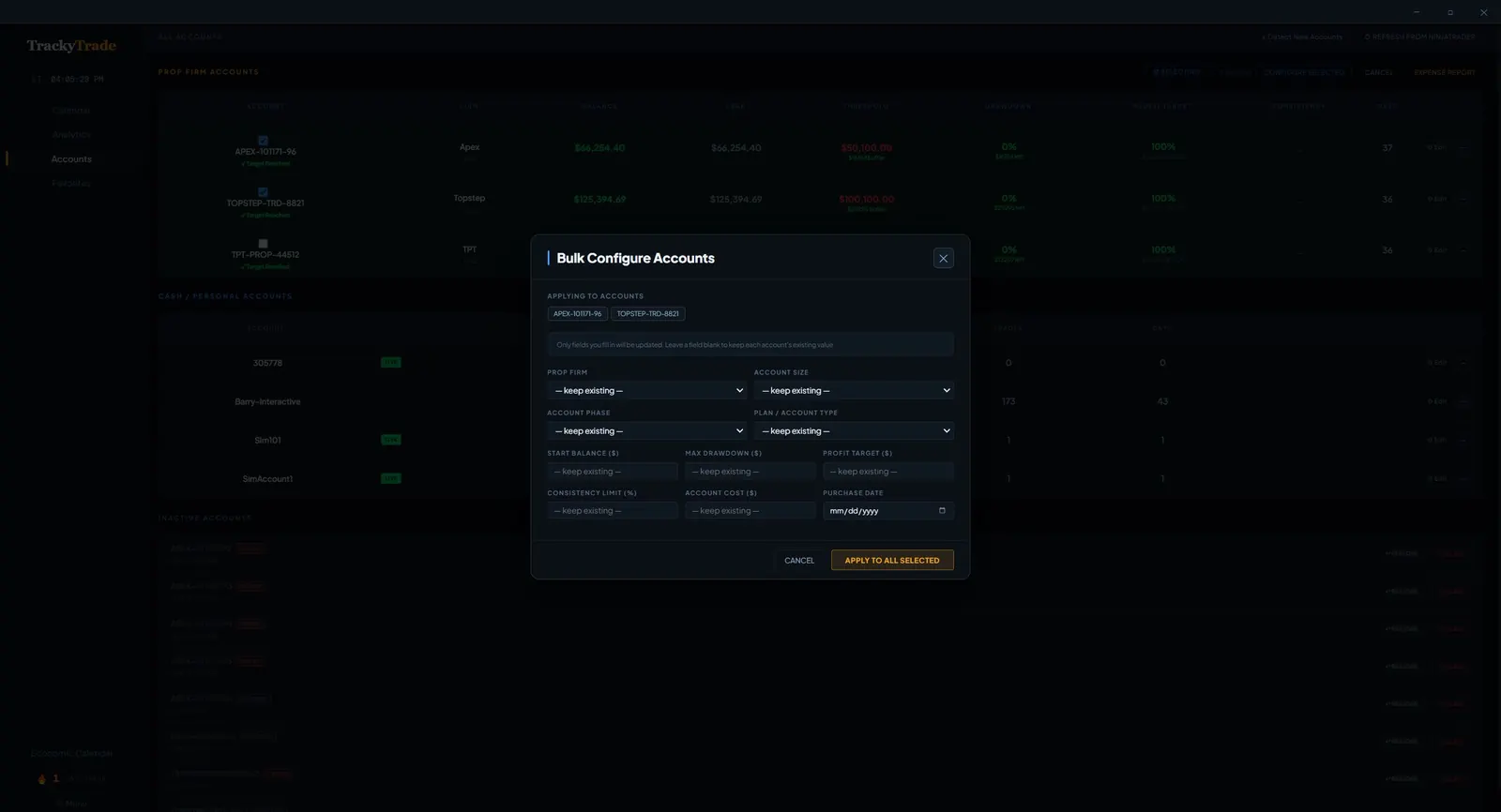
Track all your prop firm accounts in one place — Apex, Topstep, TPT, MFFU, Tradeify, TradeDay, Bulenox, FundedNext, Lucid, and more. Every prop firm setting is fully customizable: drawdown limits, consistency requirements, daily loss rules, minimum trading days, and pass/fail thresholds. TrackyTrade tells you exactly where you stand on every account in real time. Need to update settings across multiple accounts at once? Use Bulk Configure to apply firm rules to all your accounts in seconds — no clicking through each one.
TrackyTrade Account Config
Account Configuration
TrackyTrade Bulk Configure
Bulk Configure Accounts
Account Analytics
Equity CurveWin RateProfit FactorMAE / MFE
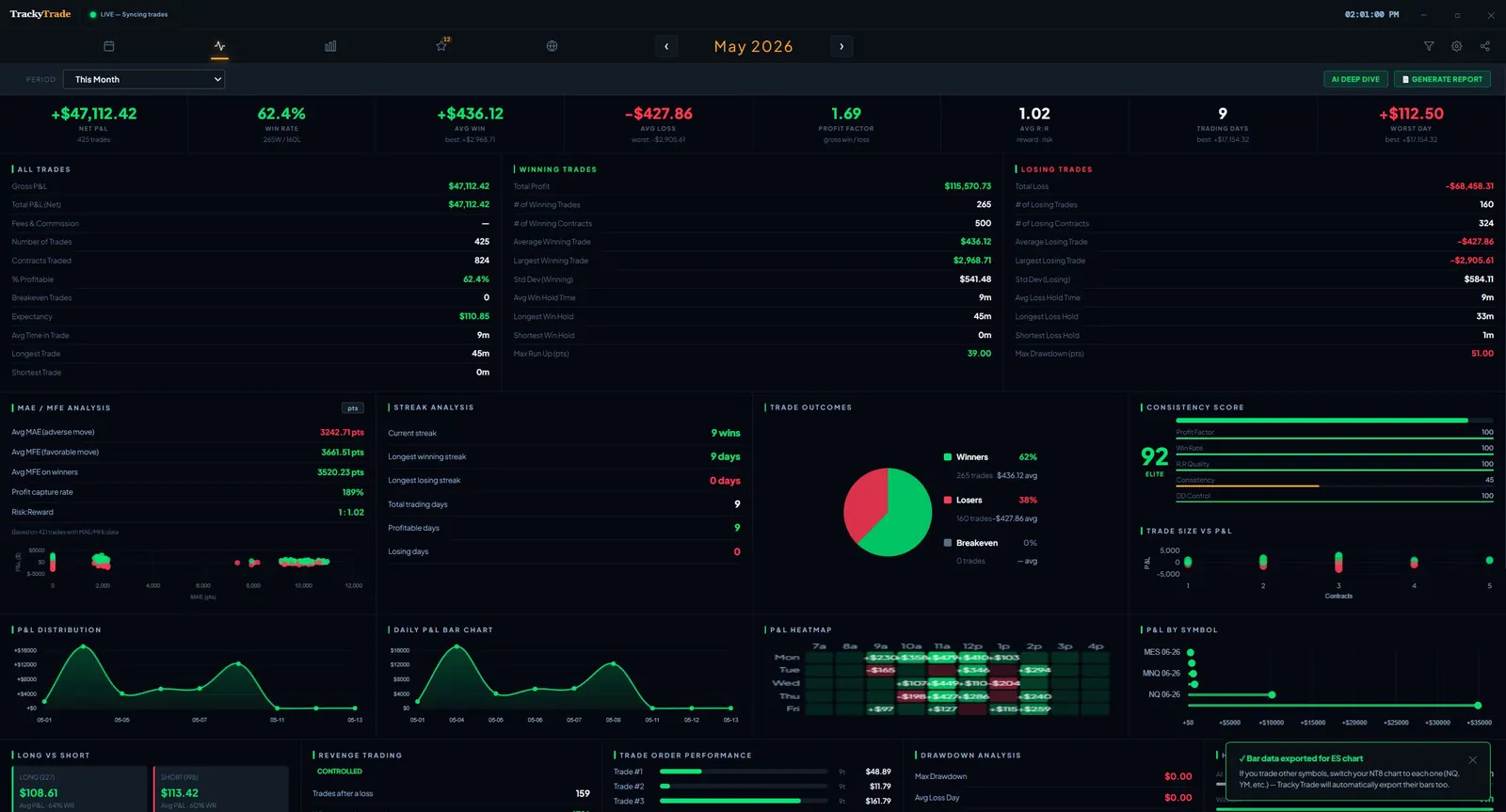
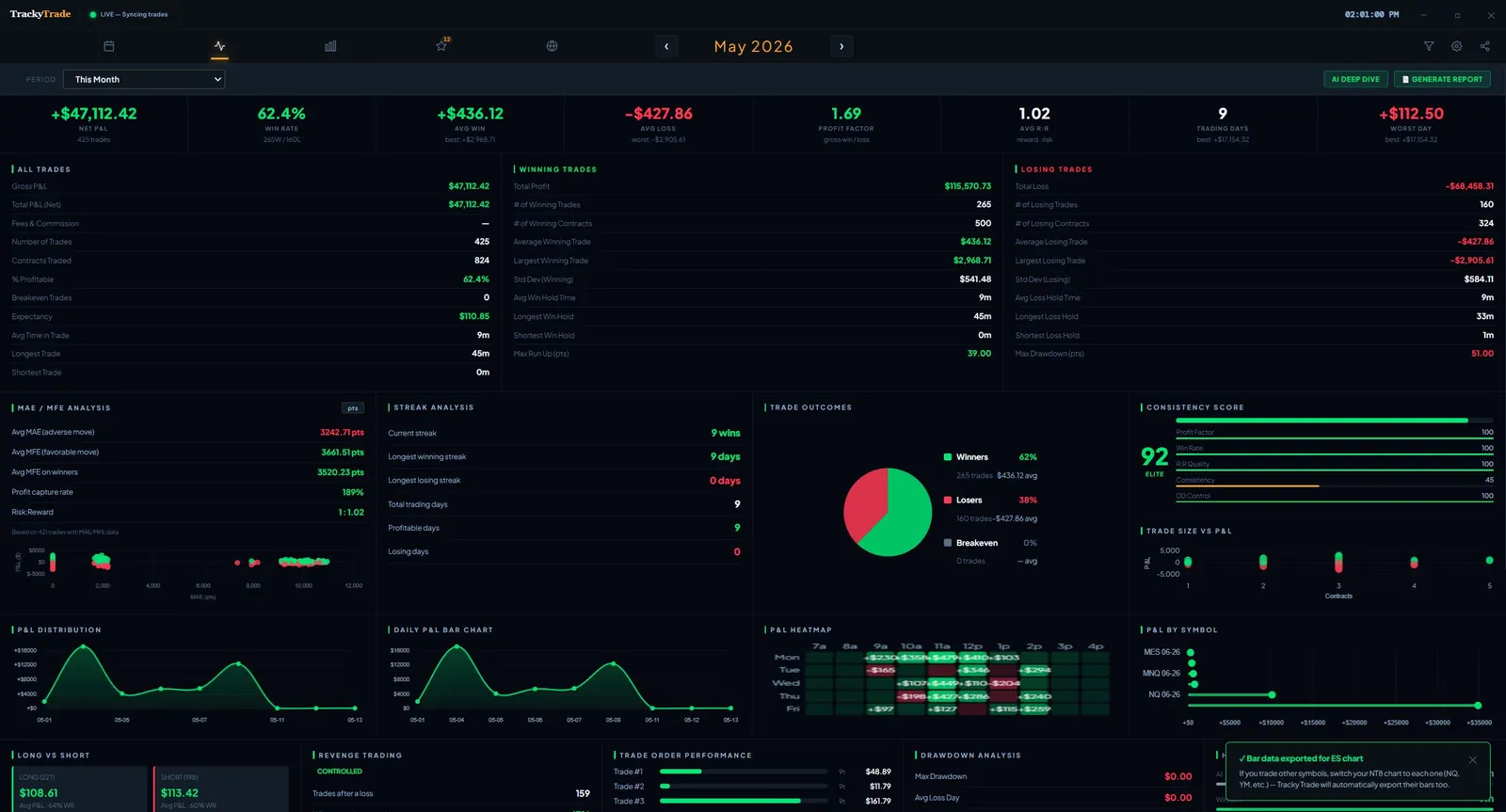
Deep analytics across all your prop accounts. Track consistency scores, win rates, best-performing accounts, and which firms your trading style suits best. Know which accounts to push and which to protect.
TrackyTrade Analytics Dashboard
Account Analytics
AI Deep Dive
Trade ScoringPattern DetectionCoaching NotesPDF Export
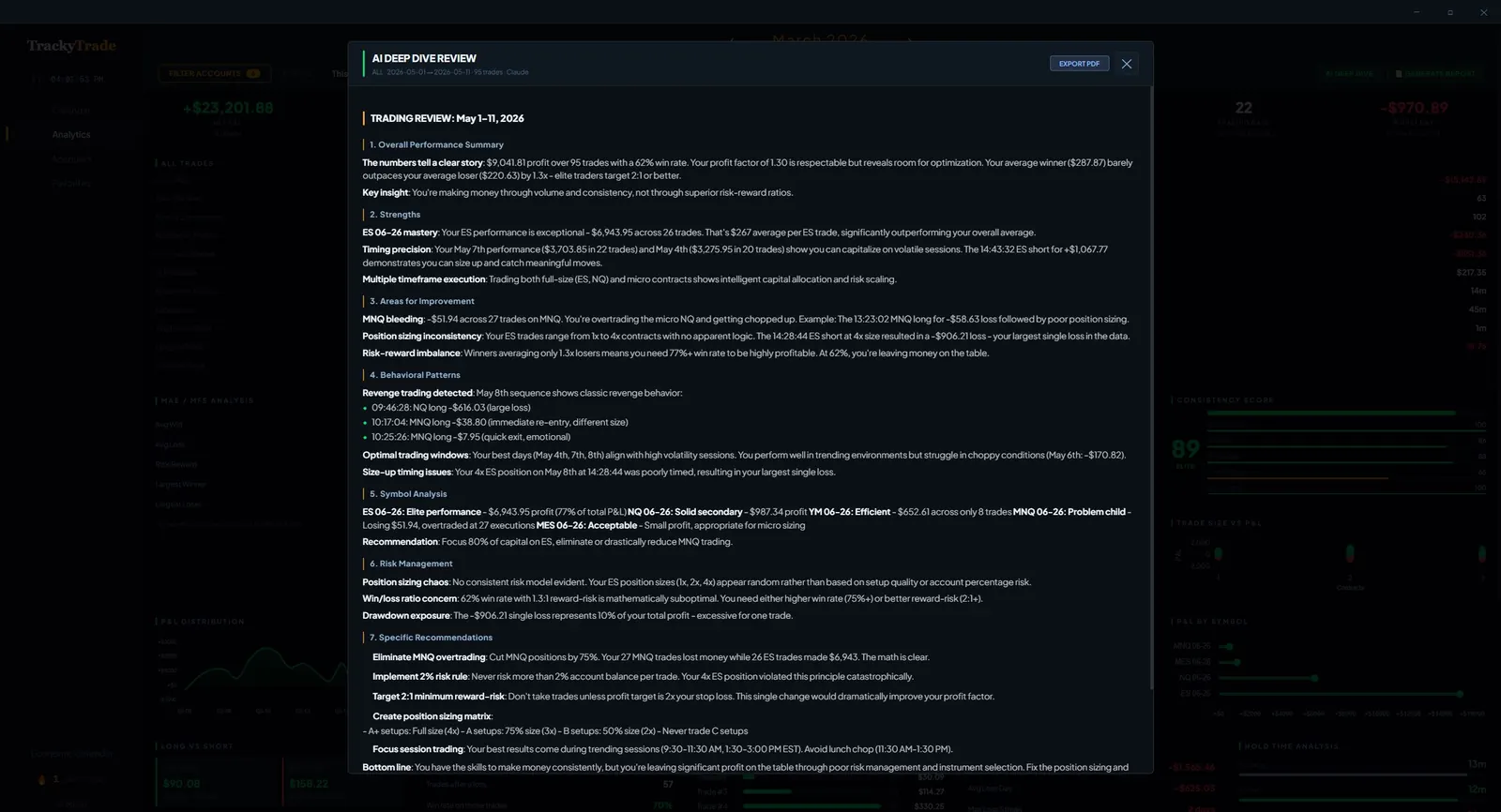
Every trade gets a full AI review powered by your own Anthropic API key — so TrackyTrade never sees your data and the cost stays at cents per review. The AI analyzes entry timing, exit management, risk discipline, and behavioral patterns across your trade history.
TrackyTrade AI Deep Dive Review
AI Deep Dive Review
Tilt Detective
Revenge TradingOvertradingLoss StreaksEmotional Patterns
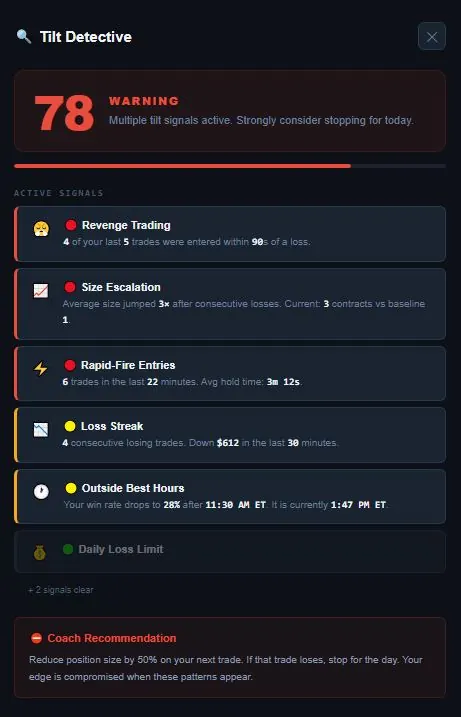
TrackyTrade monitors your trading behavior in real time and flags signs of tilt — revenge trades after losses, position sizing creep, overtrading after drawdowns. It shows you the patterns you can't see when you're in the middle of them.
TrackyTrade Tilt Detective
Tilt Detective Warning Screen
Custom Themes
Dark ModeLight ModeColor SchemesTray Icon
Four built-in UI themes — Dark, Light, Midnight, and Cream — plus the ability to create your own fully custom color scheme. Pick your exact accent colors, background, and text tones to make the app truly yours. Switch instantly from the settings menu with no restart required.
Expense Tracking
Eval FeesNet P&LTrue CostPDF Export
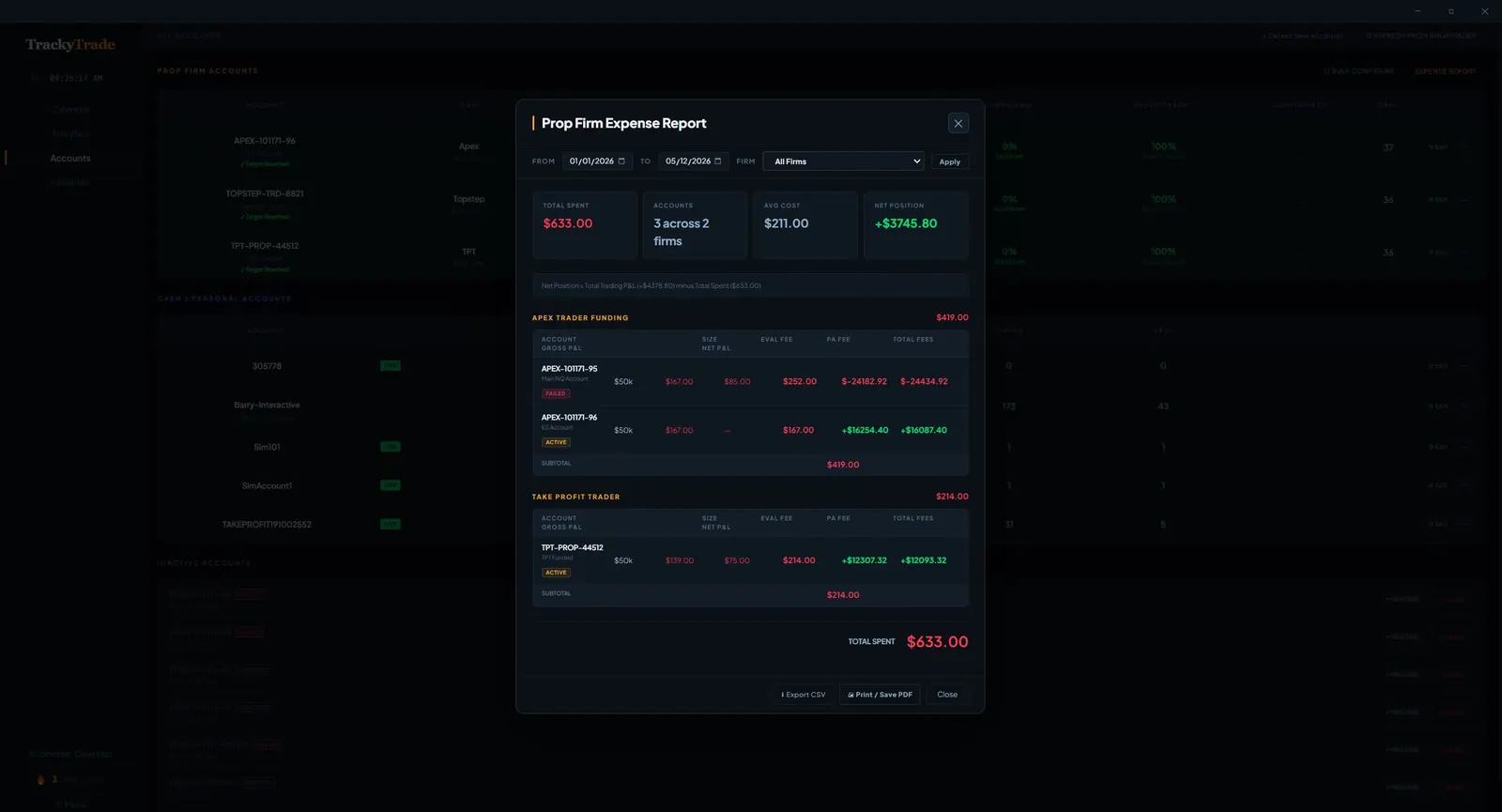
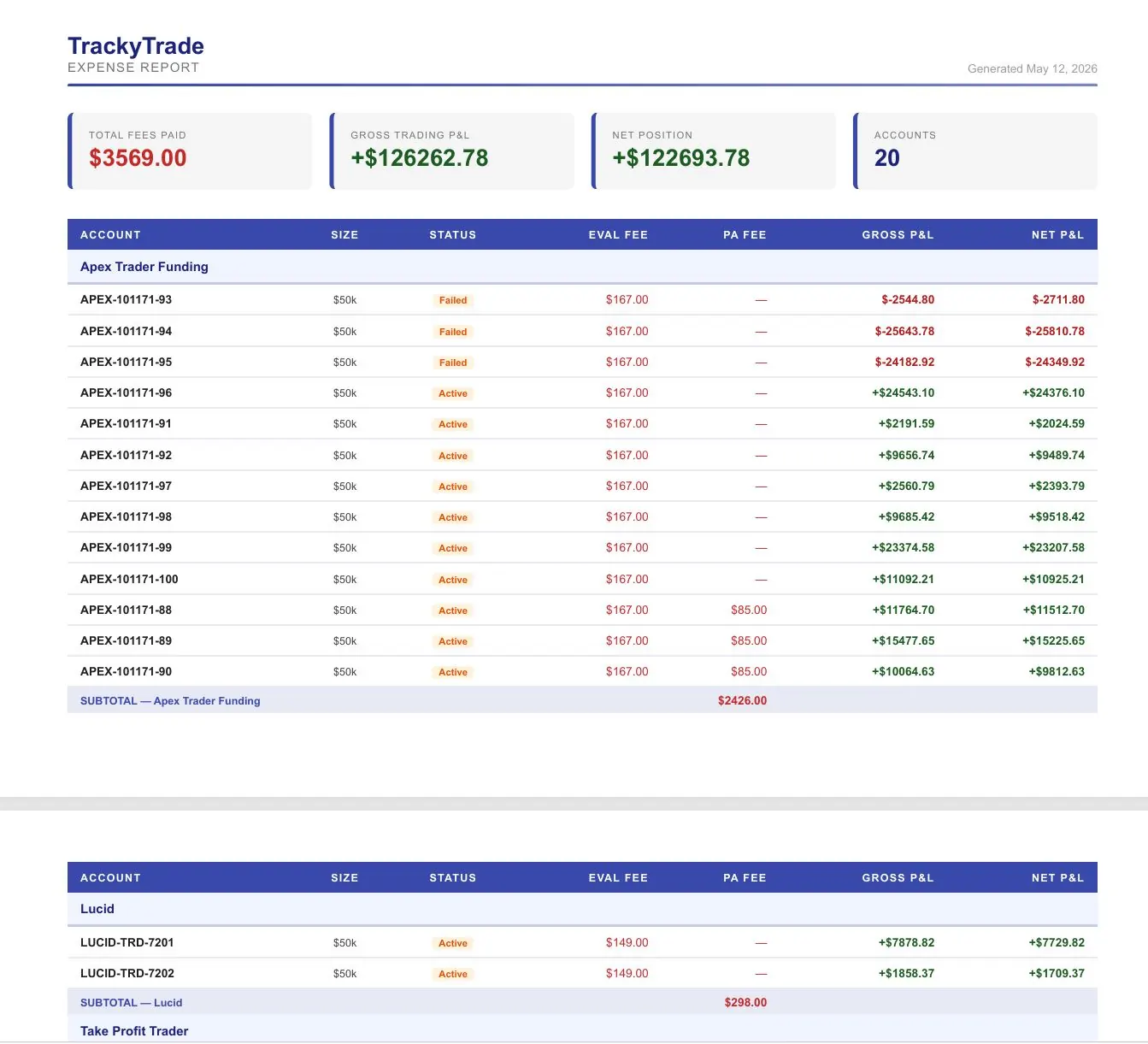
Track every evaluation fee, subscription cost, and trading-related expense. See your true trading cost and actual net profit after fees. Export customized CSV or PDF reports for any date range and any account — individually or across all firms at once. Know exactly what each funded account actually cost you to get, and have everything you need come tax season.
TrackyTrade Expense Report
Prop Firm Expense Report
TrackyTrade Expense PDF
Expense Report PDF Export
Pricing
Embarrassingly affordable.
One price. Everything included.
TraderSync Pro
$79.95/mo
$959 / year
TradeZella Pro
$59.95/mo
$719 / year
TrackyTrade
$10/mo
$99 / year
Invest what you save.
Who it's for

Made for every trader
on every major platform.

NinjaTrader 8 QuantTower CSV Import

Tradovate integration coming soon

  • Profitable some days, blown up the next. You don't have data on what's actually different between your good and bad sessions.
  • You keep repeating the same mistakes. Revenge trades, overtrading after a loss — you know it's happening but can't see the pattern clearly.
  • Your journal is a spreadsheet you never open. Manual entry is tedious. By the time you sit down to review, the trades are a blur.
  • No clear picture of your actual edge. You think you're profitable on certain setups but can't prove it. The data is there — it's just never been organized.

TrackyTrade is built for futures traders on all major platforms — NinjaTrader 8 and Quantower sync in real time. Whether you're grinding prop firm evals or trading your own cash account, trades log automatically the moment they close. AI coaching tells you what to fix.

Also works via CSV watch folder
Tradovate  ·  Rithmic  ·  TradeStation  ·  Interactive Brokers  ·  and more
How it works

Set it up once.
Review every day.

TrackyTrade gets out of your way during market hours and is instantly ready for review when you're done trading.

Step 1

Connect Your Platform

Add the TrackyTradeSync indicator to your 1-minute charts. Save as a Workspace so it auto-loads every time NT starts. That's it — you're syncing.

One-time setup · 5 minutes
Step 2

Trade normally

Every trade closes and syncs to TrackyTrade instantly. Your calendar, analytics, and AI coaching are waiting for you when the session ends.

Fully automatic
Step 3

Review and improve

Open TrackyTrade after the session. Read AI reviews, check behavioral analytics, spot the patterns. Run the monthly deep dive to track progress week over week.

15 minutes/day changes everything
Subscribe
COMMON QUESTIONS

Frequently Asked Questions

How much does TrackyTrade cost?
$10/month or $99/year. A 7-day free trial is included — no credit card required to start.
Does it work with NinjaTrader 8?
Yes. The TrackyTradeSync indicator syncs trades from NT8 within 1–2 seconds of each trade closing. No CSV export needed.
Does it work with Quantower?
Yes. TrackyTrade includes a native C# Quantower indicator that syncs via your Rithmic/RTrader Pro connection.
Does TrackyTrade track the Apex 30% consistency rule?
Yes — in real time. The Consistency Score turns amber as you approach 30% of profits from one day and red if you exceed it.
What is the Tilt Detective?
Tilt Detective automatically detects revenge trading patterns in your execution data — rapid re-entries after losses, size increases after drawdowns — with no manual journaling.
How is TrackyTrade different from Tradezella or TraderVue?
TrackyTrade syncs automatically from NT8 and Quantower. Tradezella and TraderVue require manual CSV imports. TrackyTrade also includes a live prop firm dashboard.
How is TrackyTrade different from Edgewonk?
Edgewonk requires manual emotion journaling. TrackyTrade automatically detects behavioral patterns from your trade data. It also costs $98 less per year.
Can I import trades from Tradovate?
Yes. Drop a Tradovate CSV export into your Watch Folder and TrackyTrade imports it automatically with full analytics applied.
Is there a mobile app?
Yes — app.trackytrade.com works on any device. On iPhone, tap Share → Add to Home Screen for a full-screen app experience.
What prop firms are supported?
Apex Trader Funding, Take Profit Trader, Topstep, and Funded Trading Plus are pre-configured with drawdown rules and consistency tracking.
Is my data stored securely?
Yes. Your trade data is stored in Cloudflare's KV storage with token-authenticated access. No API keys are exposed in the frontend.
Can I cancel anytime?
Yes. Cancel anytime from your LemonSqueezy account. No contracts, no cancellation fees.